
UTI PAN Photo & Signature Resizer
Convert images to official UTIITSL dimensions: 213×213 px & 400×200 px.
Click or Drag Image to Resize
Secure Client-Side Processing
Explore Other Tools
UTI PAN Photo And Signature Resizer
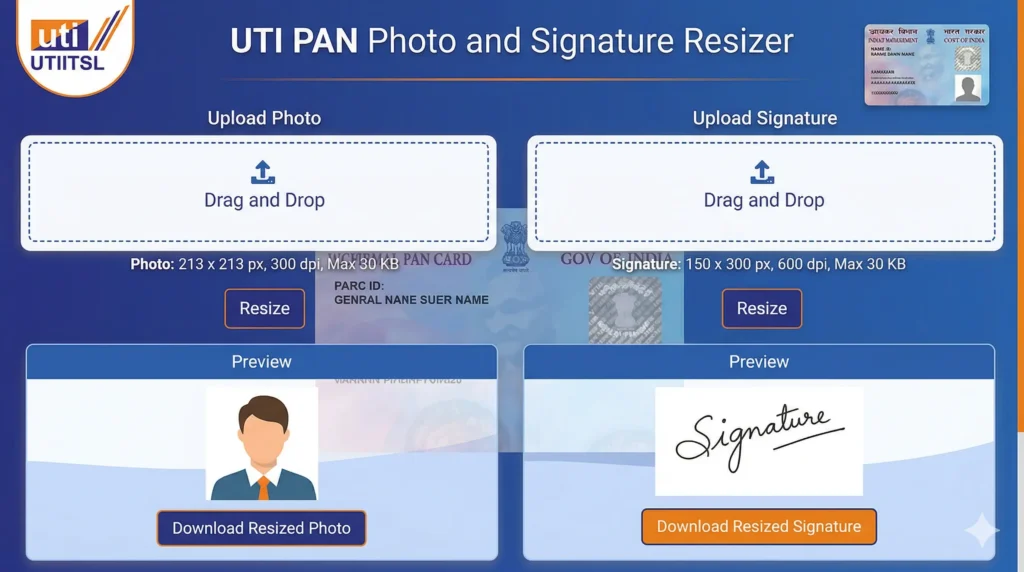
Applying for a Permanent Account Number (PAN) card via UTIITSL (UTI Infrastructure Technology and Services Limited) is a standard procedure for millions of Indian citizens. However, the most common hurdle faced during the online application process is the document upload error. UTIITSL has very specific, non-standard requirements for photographs and signatures. If your images are not exactly 213×213 pixels for the photo or 400×200 pixels for the signature, the portal will reject your application instantly.
A UTI PAN Photo And Signature Resizer is an online or offline tool designed to adjust the dimensions, file size, and format of your photo and signature so they meet the guidelines set by UTI Infrastructure Technology and Services Limited (UTIITSL).
When applying for a PAN card, your uploaded images must meet specific criteria. If they don’t, your application may get rejected. A resizer tool ensures your files are compliant before submission.
UTI PAN Card Photo and Signature Requirements
Before using any resizer, you must understand the official specifications.
📷 Photo Specifications:
- Format: JPEG/JPG
- Size: 10 KB to 200 KB
- Dimensions: 3.5 cm x 2.5 cm
- Background: White
- Face should be clearly visible
✍️ Signature Specifications:
- Format: JPEG/JPG
- Size: 4 KB to 30 KB
- Dimensions: 2 cm x 4.5 cm
- Signature should be in black ink on white paper
Why is resizing a UTI PAN a challenge?
Most users try to use standard mobile apps or simple MS Paint to resize their photos. The problem arises with the DPI (Dots Per Inch) settings. While a photo might look like it’s 213×213 pixels, if the internal DPI metadata is set to 72 or 96 (standard for web), the UTI portal might still flag it.
Our UTI PAN Resizer uses an advanced scaling algorithm that not only adjusts the pixel dimensions but also optimizes the internal encoding for high-density requirements. This ensures that even when compressed under 30 KB, your facial features remain sharp and identifiable.
Best Tips for Scanning and Uploading
As experts in government registration utilities, we recommend these tips to avoid common pitfalls:
1. The Signature Clarity
Always sign on pure white paper. If you sign on a ruled paper or a paper with a yellowish tint, the 600 DPI scan will pick up the background noise, potentially leading to a rejection. Use a bold black gel pen for the best contrast.
2. Avoiding “Face Not Found” Errors
Ensure that your face occupies at least 75% of the frame in the 213×213 px photo. If your shoulders are too wide or the camera is too far away, the face becomes too small for the automated verification system to recognize.
3. Correcting File Size (KB)
If your photo is over 30 KB, our tool automatically applies a compression pass. However, if the source image is 10 MB, the compression might be too heavy. Try to take a standard-resolution photo from your phone before using the resizer for the best clarity.
How to Use the UTI PAN Resizer Tool
We have optimized the interface for speed:
- Upload: Click the large dashed box to select your photo or signature scan.
- Select Target: Choose “UTI Photo” or “UTI Signature” from the dropdown.
- Process: Click ‘Resize & Download’.
- Verification: A preview appears. If it looks correct, click the green download button.
Frequently Asked Questions (FAQs)
1. Why does UTI require exactly 213×213 pixels?
This is a legacy requirement from the UTIITSL printing system. It ensures that the photo fits perfectly on the physical PAN card without any distortion when printed at 300 DPI.
2. Can I use the same photo for NSDL and UTI?
No. NSDL usually accepts standard 3.5×2.5 cm photos, while UTI is very strict about the 213×213 px square format. Always use a dedicated tool for each portal.
3. My signature is blurred after resizing to 400×200. Why?
If your original signature was very small or taken in low light, resizing it to a 600 DPI target like 400×200 will show the grains. Try signing again with a darker pen and better lighting.
4. Is there a limit on how many photos I can resize?
No. Our tool is free and unlimited for all users of RojgarResultTools.
5. Does this tool work on mobile devices?
Yes! The tool is fully responsive. You can snap a photo of your signature, upload it, and resize it right from your smartphone.
 Join WhatsApp Channel